On this page
An AI chatbot talks. An AI agent does things: it reads your files, drafts emails, fills in forms, runs commands. That is what makes agents useful, and it is also what makes them risky. A chatbot that gets something wrong gives you a bad answer. An agent that gets something wrong might send it to your biggest client.
The short answer: treat everything an AI agent wants to do as a proposal, not an order. Let it read and search freely, make it ask before it sends, publishes, pays or changes anything, and ask for more than a click when the action is hard to undo. Show exactly what will happen before you ask for a yes. That is how we built Pivra Desk: it asks before anything consequential.
Why agents need approval steps#
Three things about today's AI models make approval steps necessary rather than optional.
Models are confident when they are wrong. A model can misread an instruction, mix up two people with similar names, or pick the wrong file, and describe what it did in the same calm tone as when it gets it right.
Models can be steered by what they read. An agent that reads web pages and emails is reading text written by strangers. Some of that text may be written to manipulate it. This is called prompt injection, and there is no complete fix for it today. If the agent can act on anything it reads, a stranger's email can become an instruction.
Some actions can't be undone. A sent email stays sent. A payment can be hard to reverse. A deleted folder may be gone. The cost of a mistake is not the same across actions, so the level of checking shouldn't be either.
An approval step addresses all three. It puts a person between the model's suggestion and the real world, at the points where it matters.
Principle 1: the model proposes, policy decides#
The most important design choice is where the decision lives. If the model decides whether an action is allowed, then anything that can influence the model, including a cleverly worded web page, can influence that decision.
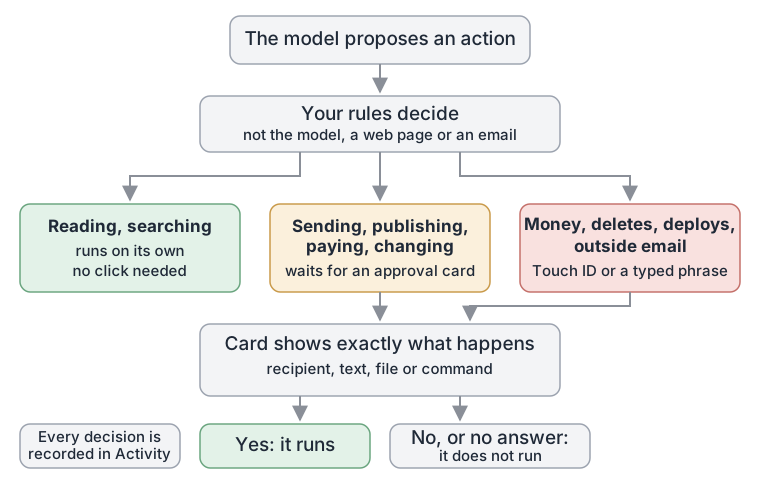
So the decision should live outside the model. The model says "I want to send this email to this person with this text." Separate rules, which the model cannot rewrite, decide whether that runs on its own, waits for a person, or is refused. No web page, email or model reply should be able to grant itself permission.
Principle 2: sort actions by what they could change#
Asking about everything is as bad as asking about nothing. If every step needs a click, people stop reading the requests and click "yes" out of habit. Approval fatigue turns a safety step into a ritual.
A better approach is to sort actions into tiers by consequence:
- Reading and looking things up. Opening a file, searching the web, checking a calendar. These don't change anything, so they can run without asking.
- Changing something or reaching other people. Sending a message, publishing a post, editing a file, running a command. These wait for a yes.
- Hard to undo or high stakes. Moving money, deleting things, deploying software, emailing someone outside your organisation. These need something stronger than a click.
Here is what such a policy might look like, written as a simple generic example:
read_file:      allow
web_search:     allow
send_email:     ask
run_command:    ask
delete_files:   ask_strong   # fingerprint or typed phrase
transfer_money: ask_strong
The exact categories will differ by product. The idea is the same: spend the person's attention where the risk is.
Principle 3: show exactly what will happen#
"Allow the agent to send an email?" is not a real question. Nobody can make a good decision from that. A useful approval request shows the actual action: who it goes to, the full text, which file will change and how, the exact command.
If the request is vague, the approval is meaningless. If it is specific, the person can catch the wrong recipient, the wrong attachment or the half-finished draft before it leaves.
Two related details matter more than they seem:
- Approve the exact thing. What runs should be exactly what was shown. If the agent changes the draft after you approve it, that is a new action and needs a new yes.
- Flag unfinished work. If a draft still contains a placeholder such as "[Your Name]", the approval should make that obvious.
Principle 4: make "no" safe and silence safe#
Declining should be easy and should not break anything. The agent should be told, and should carry on without that step.
Silence matters too. If you walk away without answering, the safe default is that nothing happens. An action that runs because nobody objected in time is not an approved action.
Principle 5: stronger checks for bigger stakes#
For the highest-risk actions, a single click is too easy to give by accident or by habit. A second factor, such as a fingerprint or a short phrase you type, slows you down for a moment at exactly the point where slowing down is worth it.
The same thinking applies to remote approvals. Answering from your phone is convenient, but it is also easier to tap without reading. It is reasonable to keep the most serious actions to the computer itself, or to require the typed phrase.
Principle 6: let people write their own rules#
Every business has its own lines. "Never email anyone at our competitor's domain." "Ask before posting on LinkedIn." "I send invoices myself." Rules like these should be easy to write in plain words, easy to read back, and should tighten the defaults rather than quietly loosen them.
Principle 7: keep a record#
Every run should leave a trail: what the agent read, what it proposed, what you decided, what happened. A record lets you check an agent's work after the fact, understand a mistake, and adjust your rules.
How Pivra Desk applies this#
Pivra Desk is a local-first personal AI agent for Mac and Windows (it runs on your computer and keeps your data there). It works across your files, browser and apps, and asks before consequential actions. Here is what that looks like from your side:
- Reading and searching run on their own. Looking at a file, a calendar or a web page runs without a click.
- Sending, publishing, paying and changing wait for you on an approval card that shows exactly what will happen: the recipient, the text, the file, the command.
- Critical actions need more. Moving money, deleting, deploying and email to anyone outside your trusted domains need Touch ID on a Mac that has it, or a phrase you type. No agent moves money on its own.
- Allow, Decline, or Always allow. Decline tells the agent, and it carries on without that step. Always allow is not offered for commands, because approving one command must not approve every other.
- Unanswered means not done. If you move on without answering, the card settles itself and the action does not run.
- Rules in plain words. You can write rules such as "Never email anyone at example.com". A "never" rule stops the action at once; an "ask" rule turns an automatic step into a card.
- Every run is recorded on your computer, in Activity: the steps, the tools called, what was read and what you decided.
The details are in approvals, rules and Touch ID and on the Pivra Desk security page.
What approvals don't do#
Approval steps are a safeguard, not a guarantee. They depend on the person reading the card. They don't make the model smarter, and they don't stop it from drafting something poor; they stop the poor draft from going out unseen. They belong alongside the other basics: give the agent only the access it needs, keep secrets in a proper vault rather than in instructions, and review what it did.
What this means for your business#
If you are trying an AI agent at work, from us or anyone else, ask three questions before you connect it to your email or accounts. What can it do without asking? What does it show you before it acts? What happens if you don't answer? If the answers are vague, keep it away from anything that sends, pays or deletes.
Download Pivra Desk for Mac or Windows. The free plan has no card and no trial clock. Give it something real from your week, and watch it ask before it acts.
Topics
- AI agents
- Human in the loop
- Approvals
- Pivra Desk
- AI safety
Author
The Pivra Team
Pivra
The Pivra team writes from product, onboarding, and customer support work with Australian tradies, local services, and small business operators.