On this page
The fear most business owners have about AI chatbots is simple: what if it tells a customer something that isn't true? A wrong price, a service you don't offer, a promise you never made. The fear is reasonable. Language models are very good at producing fluent, confident text, whether or not it is correct.
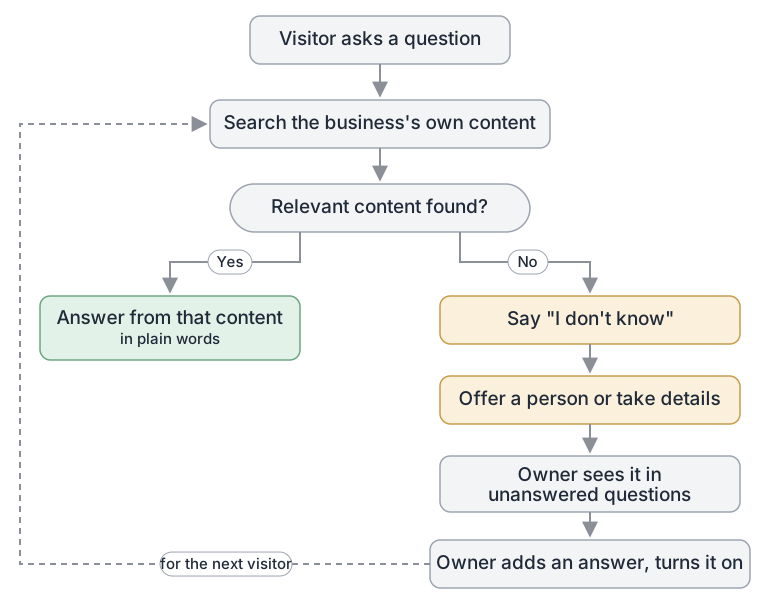
The short answer: a well-built website chatbot does not answer from what the AI model happens to "know". It searches your own content first, answers only from what it finds, and says "I don't know" when it finds nothing useful. Then the important part: that unanswered question goes somewhere. The visitor is offered a person or a way to leave details, and you see the question so you can add an answer for next time.
This post explains how that works. For a practical checklist, see how to reduce wrong AI chatbot answers.
Why AI models make things up#
A large language model learns patterns from a huge amount of text. When you ask it a question, it predicts a likely answer, word by word. It does not look anything up unless it is built to.
So if you ask a general model "What does Smith Plumbing charge for a callout?", it has no way to know. But it has seen thousands of plumbing websites, so it can produce something that sounds right: a plausible figure, a plausible policy. People call this "hallucination". The model is not lying. It is doing what it was trained to do, which is to produce likely text. Likely is not the same as true.
For a business, that is the wrong behaviour. You want the chatbot to say what your business says, and nothing else.
Grounding: answer from the business's own content#
The fix is called grounding. Instead of relying on the model's memory, the system gives the model the right material at the moment of the question and tells it to answer from that material.
The most common way to do this is retrieval-augmented generation, usually shortened to RAG. It works in three steps:
- Prepare your content. Your web pages, documents and written answers are split into small passages and stored in a way that can be searched by meaning, not just by exact words. So "How much is a callout?" can find a passage that says "Our standard call-out fee is…".
- Search when a question arrives. When a visitor asks something, the system finds the passages most related to the question.
- Answer from what was found. The model receives the question, the relevant passages and an instruction: answer only from this material. If the material doesn't cover it, say so.
The model still writes the reply in natural language. But the facts in that reply should come from your passages, not from its general training.
The part people skip: saying "I don't know"#
Grounding only works if the system is allowed to fail honestly. If the search finds nothing relevant and the model is still expected to produce an answer, it will fill the gap, and you are back to made-up answers.
So a grounded chatbot needs a clear rule for the empty case: if the material does not answer the question, say so plainly and offer a next step. Something like:
"I don't have that information. I can take your details so the team can get back to you."
It feels counter-intuitive to want a chatbot that says "I don't know". In practice, customers trust a business more when its assistant admits a gap than when it confidently gets something wrong. A wrong answer costs you a customer, or worse. "I don't know, but here is how to reach us" costs you very little.
What should happen next#
"I don't know" is not the end of the conversation. It is the start of two follow-ups: one for the visitor, one for you.
For the visitor: a person, or a way to leave details#
The visitor still has a question. A good chatbot gives them a way forward: an offer to bring in someone from the team, or a short form to leave a name and number so someone can call back. The point is that the visitor leaves with a path, not a dead end.
For you: a list of what it couldn't answer#
Every "I don't know" tells you something. It might be a gap in your website, a question customers ask often that you have never written down, or a service you offer but never described. Collected in one place, these questions are one of the most useful things a chatbot produces. They show you, in your customers' own words, what your website is missing.
The loop is simple: read the list, write an answer for the ones that matter, and the chatbot can answer the next person who asks.
Grounding is not a guarantee#
Grounding greatly reduces made-up answers. It does not make them impossible. A few things can still go wrong:
- Your content contradicts itself. If an old price list and a new one are both in the knowledge base, the chatbot may find the wrong one.
- Your content is out of date. The chatbot faithfully repeats a policy you changed last month.
- The search finds something nearby but not quite right. A passage about weekend rates is used to answer a question about public holidays.
- The model paraphrases loosely. It puts your answer in its own words and shifts the meaning a little.
The defences are mostly about your content, not the AI: one current version of each fact, a habit of updating the chatbot when your website changes, and fixed wording for anything where exact words matter.
How this works in Pivra#
Here is what Pivra does today, in plain terms:
- Answers from your knowledge. Pivra extracts the text from your website, files and written content, splits it into searchable passages, and gives the most relevant passages to the model when a visitor asks a question. See training sources.
- Strict mode. With strict mode on, the chatbot answers only questions it can find context for in your knowledge base, and declines others with a message you can customise. See improving responses.
- Fixed answers when wording matters. Refinements are question-and-answer pairs you write yourself, used word for word. See refinements.
- A person when it can't answer. On plans with human handoff, when the chatbot couldn't answer, it can offer the visitor a person from your team. If nobody picks up within the time you set, the visitor can leave a phone number so you can call back. See human handoff.
- Unanswered questions. In the dashboard, Unanswered questions lists the questions your chatbot couldn't answer, with what the visitor asked and what the chatbot replied. It covers website chat, Messenger, Instagram and Slack; WhatsApp isn't covered yet. Add an answer saves the question as a draft in Refinements. The draft is not used until you write the answer you want and turn it on; from then on, the chatbot can give that answer.
Our security page explains how the service itself is run.
A worked example#
A visitor to an electrician's website asks: "Do you install EV chargers?"
The electrician's website lists switchboards, lighting and safety inspections, but says nothing about EV chargers.
- Without grounding: the model knows many electricians install EV chargers and replies "Yes, we install all major EV charger brands." The business doesn't.
- With grounding and an honest fallback: the search finds nothing about EV chargers, so the chatbot says it doesn't have that information and offers to take the visitor's details.
- Afterwards: the owner sees "Do you install EV chargers?" in the unanswered list. If they do offer it, they write a short answer and turn it on. If they don't, they write that too, so the next person gets a straight "No, but here is who we'd recommend."
The second visitor gets a correct answer. Nobody had to guess.
What this means for your business#
An AI chatbot is only as good as the content it answers from and the honesty of its fallback. Before you go live, check that your website and documents say what you actually do and charge today. Write the sentence you want it to use when it doesn't know. Then, once it is running, make reading the unanswered questions a weekly habit. It is a habit that pays off quickly.
Start free with Pivra: one chatbot, 500 messages a month, no card required. It is enough to train the chatbot on your own pages and see how it answers, and how it handles what it doesn't know, before any customer does. Handing over to a person and taking visitors' details are on paid plans; see pricing.
Topics
- AI hallucinations
- Grounding
- Chatbot accuracy
- Knowledge base
- Unanswered questions
Author
The Pivra Team
Pivra
The Pivra team writes from product, onboarding, and customer support work with Australian tradies, local services, and small business operators.