On this page
When you set up a website chatbot, one of the first things you do is give it your web address. A few minutes later it knows your services, your hours and your service area. That step looks simple from the outside. Underneath, it is one of the places where a careless system can be turned against the network it runs on.
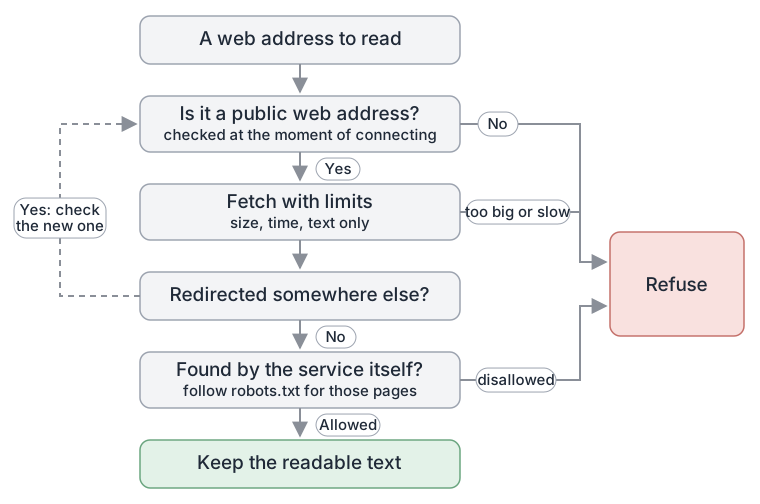
The short answer: a chatbot service that reads web pages for you is, in effect, a computer that will visit any address someone types in. Done safely, it visits only public web addresses, checks every redirect before following it, stops reading when a page is too large or too slow, ignores anything that is not text, and leaves alone the pages your robots.txt file asks bots to skip. This post explains why each of those rules exists.
What "reading your website" actually involves#
When you give a chatbot your web address, the service sends its own request to that address, the same way your browser does. It downloads the page, pulls out the readable text, and stores that text so the chatbot can search it when a visitor asks a question. If the service also looks for your other pages, it may read your sitemap (a file that lists the pages on your site) or follow the links on your home page.
The important detail is where the request comes from. It does not come from your computer. It comes from a server run by the chatbot provider, sitting inside that provider's network. That is the part worth thinking about.
The risk: a server that visits whatever it is told#
Security people call this risk server-side request forgery, usually shortened to SSRF. The name is awkward, but the idea is simple.
Imagine a courier company that will collect a parcel from any address you write on a form. That is useful. Now imagine someone writes the address of the courier company's own back office, the locked room where the keys are kept. If the courier does not check, it walks in, picks up whatever is there and hands it over.
A server that fetches web pages on request is that courier. Inside most data centres and cloud platforms there are addresses that are not meant to be reachable from the internet: internal dashboards, databases, and special addresses that hand out configuration and credentials to the machines on that network. From the outside they are invisible. From the inside, they may answer anyone who asks.
So if a page-reading service will fetch any address a user types in, an attacker does not need to break in. They type in an internal address and ask the service to fetch it for them. The OWASP Top 10, a widely used list of web application risks, gave SSRF a category of its own in its 2021 edition for exactly this reason.
For a small business owner, the practical point is this: the risk is mostly to the provider's systems, not to your website. But a provider that has not thought about it is a provider whose systems, including the place your data is stored, are easier to get into.
Rule one: only public addresses#
Every address on the internet ends up as a number, an IP address. Some ranges of numbers are reserved for private networks, for "this machine itself", or for special purposes. None of those belong to a public website.
A careful page-reading service looks up the number behind a web address before it connects, and refuses if the answer is anything other than a public address. It also refuses addresses that are not ordinary web pages at all, such as local files or other protocols.
There is a subtlety here. The step that turns a name into a number, called DNS, can give different answers at different times. A tricky setup can answer "public" when the service checks, then "private" a moment later when the service connects. This trick is called DNS rebinding. The defence is to check the address at the moment of connecting, not earlier.
Rule two: treat every redirect as a new request#
Websites redirect all the time. You type example.com, and the site sends you on to https://www.example.com/home. Browsers follow these redirects automatically, and most of the time that is harmless.
For a server, it is a loophole. An attacker can set up a perfectly public page whose only job is to redirect to a private address. If the service checks the first address, sees it is public, and then follows redirects without looking, the check has been bypassed.
The fix is to treat every hop as a fresh request: check the new address with the same rules, limit how many hops are allowed, and stop if a hop leads somewhere it should not. It is also sensible not to carry any sign-in details or cookies across to a different site during a redirect.
Rule three: limits on size, time and type#
Not every risk is about where a request goes. Some are about what comes back.
- Size. A page can be enormous by accident or on purpose. A small compressed file can also expand to something huge once it is unpacked. A careful service counts bytes as they arrive and stops once a limit is reached, rather than trusting what the page claims about its own size.
- Time. A slow server can hold a connection open for a very long time. A deadline on each request keeps one slow site from tying up the system.
- Type. A chatbot needs text. Images, videos, programs and archives are not useful to it and add risk. Checking that the response is text, and refusing the rest, keeps the reading step narrow.
None of these limits is exotic. They are the ordinary hygiene of any system that downloads things from the open internet on someone else's behalf.
Rule four: respect the site owner's choices#
Safety is not only about protecting the provider. It is also about behaving well on your website and everyone else's.
Most sites have a small file at /robots.txt that tells automated visitors which parts of the site they may read. It is a long-standing convention, now written up as an internet standard (RFC 9309). A typical file looks like this:
User-agent: *
Disallow: /admin/
Disallow: /checkout/
Sitemap: https://www.example.com/sitemap.xml
That says: all bots, please stay out of the admin and checkout areas, and here is the list of pages we would like you to read.
When the service goes looking for more pages by itself, robots.txt should decide which it may use.
It also makes sense to stay on the site you entered and skip pages that are of no use to a customer, such as sign-in screens, shopping carts and account pages. Reading those wastes effort and risks pulling in content that was never meant to be public.
What we do at Pivra#
When you add a website to Pivra, this is what we say publicly:
- Pivra checks that a web address is a public HTTP or HTTPS address, applies limits to how much it fetches, and rejects unsafe network locations and responses that are not text. See training sources.
- When Pivra looks for your pages itself, through your sitemap or the links on the page you entered, pages your robots.txt asks bots to skip are left out. You can add or remove pages afterwards in Knowledge.
- Uploaded files are checked by their contents rather than by their file name alone, and password-protected, malformed, oversized or unsupported files are rejected.
We don't publish the exact limits or the internal mechanics. Publishing them would help someone looking for a gap more than it would help you, and that is common practice for security controls. Our security page explains how the service itself is run.
Questions worth asking any provider#
If you are comparing chatbot services, or any tool that "reads your website", these questions are fair to ask:
- Do you block requests to private and internal network addresses?
- Do you check redirects, not just the first address?
- Do you limit how much you download and how long you wait?
- Do you respect robots.txt when finding pages?
- What happens to the text you collect, and where is it stored?
A provider that has thought about this should be able to answer in plain words without hesitating. You do not need to understand every detail of the answer. You need to hear that someone has thought about it.
What this means for your business#
You do not have to defend against SSRF yourself. That is the provider's job. What you can do is choose providers that take it seriously, keep a sensible robots.txt on your own site, and keep private material, such as admin pages, staff areas and customer records, behind a sign-in rather than relying on "nobody will find it".
Then point the chatbot at the public pages you want customers to hear about, check what it learned, and fix anything that is out of date.
Start free with Pivra: one chatbot, 500 messages a month, no card required. Give it your website and see what it reads.
Topics
- Website crawling
- Web security
- Ssrf
- Robots.txt
- Chatbot training
Author
The Pivra Team
Pivra
The Pivra team writes from product, onboarding, and customer support work with Australian tradies, local services, and small business operators.