Guide Visitors to Appointments With AI Chat, Calendly and Google Calendar
A practical guide for clinics, consultants and trades showing how to connect an AI chatbot to Calendly or Google Calendar so visitors can find the right booking path.
If you run a clinic, consultancy, trades business, or any service where time equals revenue, you know the admin drag: emails back and forth to find a time, calls that go to voicemail, double-bookings, no-shows.
One option is to let the assistant answer approved questions and share the correct booking link. A person should still handle enquiries that need judgement or confirmation.
This guide is the practical end-to-end setup for Pivra's Appointment Booking integration with Calendly and Google Calendar.
Who this is for
This works particularly well for:
- Healthcare and allied health — physio, psychology, chiro, dental, GP clinics
- Trades and home services — electricians, plumbers, builders taking inspection bookings
- Professional services — accountants, mortgage brokers, financial planners, consultants
- Beauty and wellness — salons, massage, personal training
If your business model includes booked time slots, test whether this setup reduces your administrative work.
How it works end-to-end
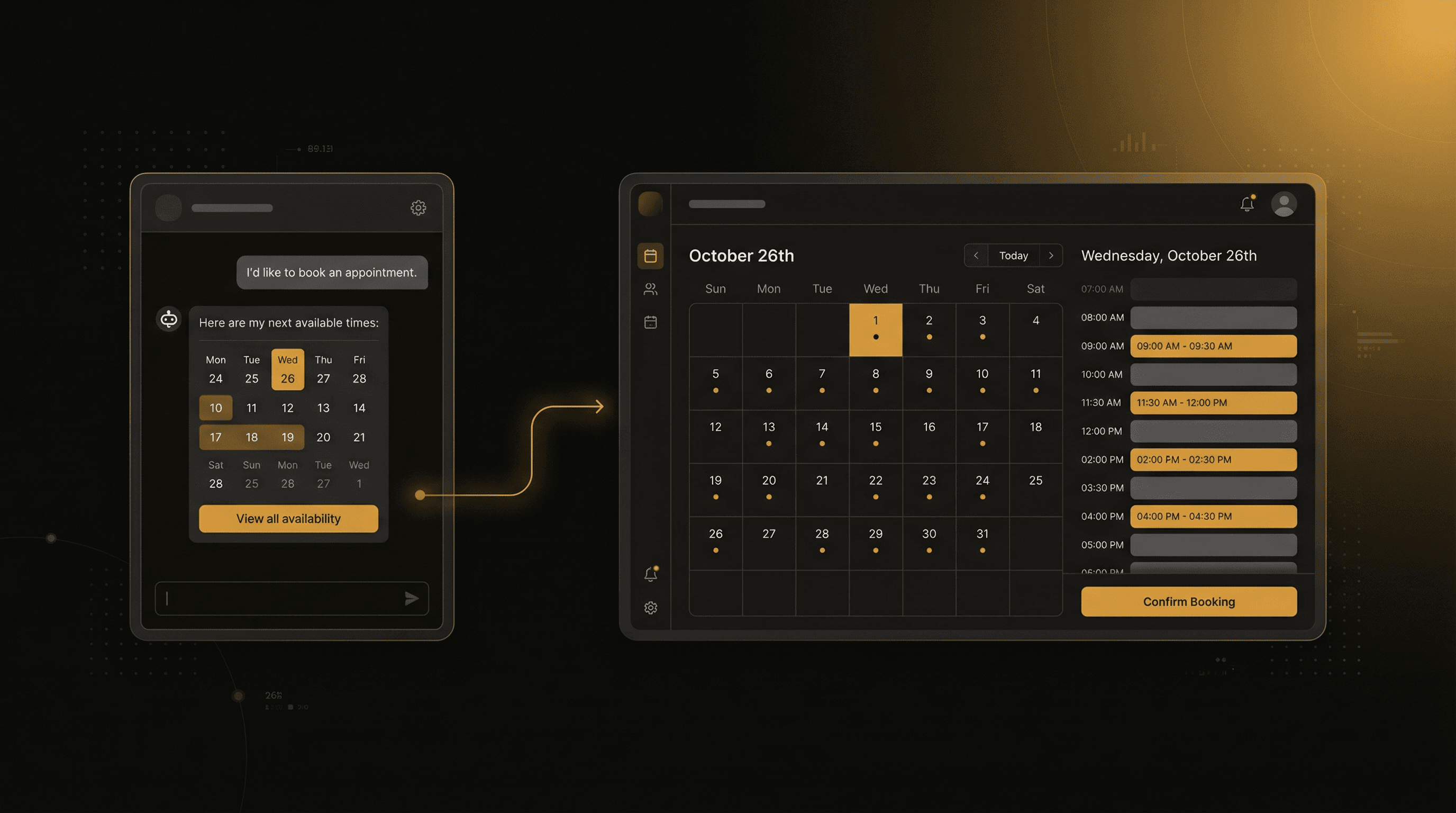
Here's the flow a visitor experiences:
- Visitor lands on your website and opens the chat widget
- They describe what they need ("I'd like to book a physio consult for lower back pain")
- The chatbot asks qualifying questions — location, urgency, insurance, preferred time
- When ready, the bot presents a booking link or embedded calendar directly in the chat
- Visitor picks a time — the appointment is confirmed instantly
- Both visitor and practitioner receive confirmation emails
- Check which lead and booking details your setup records in Pivra and in your booking tool
From the visitor's perspective, it feels like messaging a receptionist who actually knows the schedule.
Option A: Calendly integration
Calendly is the most common booking tool for service businesses. Here's how to connect it:
Step 1: Get your Calendly embed link
- Log into Calendly
- Go to Event Types and open the event you want to book (e.g. "Initial Consultation — 45 min")
- Click Share → Copy link
- Note the URL — it looks like
https://calendly.com/yourbusiness/initial-consult
Step 2: Connect in Pivra
- In Pivra, open your chatbot → Settings → Appointment Booking
- Select Calendly as the provider
- Paste your event link
- Set a trigger phrase — this is what the chatbot listens for before offering the booking link
Good trigger phrases:
- "book an appointment"
- "schedule a time"
- "I'd like to come in"
- "make a booking"
Step 3: Configure the chatbot message
Set the message that appears before the booking link. For a physio practice:
"I can show you our available times right now. Just pick a slot that works for you — it takes about 2 minutes."
You can also pre-qualify in the chat before showing the calendar. For example, for a bulk-billing clinic, ask "Are you a current patient or new?" and only show the booking link after confirming they're eligible.
Option B: Google Calendar integration
If you use Google Calendar directly (common for solo operators and small practices):
Step 1: Create an appointment schedule
- In Google Calendar, click + New → Appointment schedule
- Set your availability windows, session length, and buffer time
- Click Open booking page to get your public URL
Step 2: Connect in Pivra
Same process as Calendly — go to Appointment Booking, select Google Calendar, paste your booking page URL.
For more advanced setups (bidirectional sync, custom availability by practitioner), use the Google Calendar API integration — contact Pivra support to enable this for your account.
Setting up qualification questions
The real power of chatbot booking is qualification before the calendar appears. You can configure the bot to ask questions before showing available times.
Example for a mortgage broker:
Bot: Happy to book a free chat. A couple of quick questions first —
     are you looking to buy, refinance, or invest?

Visitor: Buy — first home buyer.

Bot: Great. Are you based in Australia? And roughly what price range
     are you looking at?

Visitor: Yes, Sydney. Probably $700k–$900k.

Bot: Perfect — I'll show you available times with [Broker Name].
     [Calendly calendar appears]
Without the chatbot, that exchange would be three emails over two days. With it, it's 90 seconds.
Handling no-shows and reminders
Pivra's Agentic Flows (Business plan) can send automated reminders before appointments:
- On booking confirmed → start a flow
- 24 hours before appointment → send reminder email or SMS webhook
- 2 hours before → send final reminder
Set up the reminder webhook to trigger your email provider (ActiveCampaign, Mailchimp, etc.) or an SMS service like Twilio via Zapier.
A reminder may help reduce missed appointments. Measure your own no-show rate before and after enabling it.
Live chat for after-hours bookings
The biggest win for most businesses is capturing after-hours bookings. A visitor at 10pm can't call your front desk. But they can:
- Chat with your bot
- Get their questions answered
- Pick a time for tomorrow or next week
- Receive instant confirmation
You wake up to a booked appointment you didn't have to do anything for.
Template library
Pivra includes pre-built chatbot templates for booking-heavy industries:
| Template | Best for |
|---|---|
| Healthcare — GP / Specialist | Medical clinics, bulk billing, referrals |
| Healthcare — Allied Health | Physio, psych, chiro, occupational therapy |
| Professional Services | Accountants, lawyers, consultants |
| Trades — Service Booking | Electricians, plumbers, builders |
| Beauty & Wellness | Salons, massage, personal training |
| Real Estate | Property viewings, appraisal bookings |
Start from a template → customise the questions and branding → connect your booking tool → embed. Most businesses are live in under an hour.
Pricing
Appointment booking is available from the Starter plan ($39/mo AUD):
- Starter: 3 chatbots, Calendly + Google Calendar integration, native integrations, up to 5,000 messages/mo
- Pro: 5 chatbots, team members, white-label branding, up to 8,000 messages/mo
- Business: 10 chatbots, Agentic Flows for reminders and follow-ups, WhatsApp channel
Start with the free plan to build your chatbot and test it — upgrade to Starter when you're ready to go live with booking.
Start free — no credit card, setup in under an hour.
Author
The Pivra Team
Pivra
The Pivra team writes from product, onboarding, and customer support work with Australian tradies, local services, and small business operators.