Intelligence on a billion devices: why your AI should run on the computer you already own
Pivra's stand: AI belongs on the computer you already own. Local-first, your choice of model, and nothing consequential happens until you say yes.
We think the next wave of AI should not live in someone else's data centre. It should live on the laptop on your desk: the one you already paid for, already trust with your files, and already carry to the office, the client's site and home.
The short answer: Pivra believes useful AI should run on the computer you own, keep your work there by default, and ask before it does anything that matters. That is how intelligence reaches a billion devices: not by renting everyone a computer in the cloud, but by making the ones we have smarter.
This is the first post in a short series written with India in mind, because we're starting in India.
The stand: the computer you own is enough to start
Many AI agents today do their work on a computer in the cloud. You type, your words travel to a server, the server reads your files and your accounts, and the answer comes back. That model works. It also means your work, your sign-ins and your bill all live somewhere else.
We built Pivra Desk the other way round:
Pivra Desk is a local-first personal AI agent for Mac and Windows. It works across your files, browser and apps using a model on your computer or a cloud model you choose, and asks before consequential actions.
"Local-first" is the important word. Your agents, chats, memory and rules live in a local database on your computer; your files stay where they are. Your passwords and keys are sealed in a vault on your machine. Nothing about your work is sent to Pivra by default, and we never train on your data. Here is exactly what stays and what leaves.
Five reasons the computer you own is the right place
1. Trust
A Mumbai CA practice holds tax returns, bank statements and PAN details for hundreds of families. A Jaipur family business keeps its ledgers, supplier quotes and GST invoices on one office PC. Neither should have to hand that folder to a server they have never seen just to get a summary written. When the agent works where the files already are, the question "who else can see this?" has a short answer.
2. Cost you can predict
A model running on your own computer costs nothing per question. You have already paid for the hardware. If you want a larger cloud model for a long job, you can bring your own key and pay that provider directly, as you go. Pivra Desk itself has a free plan, and Plus is US$6 a month for as many agents as you like (charged in US dollars outside Australia; taxes may apply).
3. Privacy by default, not by setting
Private should be where you start, not a toggle you have to find. With a model on your computer, your conversation stays on the machine; if the agent searches the web, only the search words go to DuckDuckGo. With a cloud model you chose, your request goes from your computer straight to that provider under your own account, not through us.
4. It keeps working when the internet doesn't
A model on your computer needs no connection. Reading a document, summarising a long thread or drafting a reply all work on a train, in a lift, or on an afternoon when the broadband is down. Web search and cloud models still need the internet, of course. But the core of the work does not stop when the Wi-Fi does.
5. No rented computer holding your sign-ins
When an agent books, files or fills a form on the web, it needs your logins. Pivra Desk uses a browser on your own computer, with its own profile, and those sessions never leave the machine. There is no cloud computer somewhere holding the keys to your email and your bank.
The model proposes; policy decides
An AI model is good at suggesting. It is not good at knowing when it should not act. So in Pivra Desk, everything the model wants to do is treated as a proposal. Your rules, permissions and approvals decide whether it runs.
In practice:
- Reading and searching run on their own. Looking things up never needs a click.
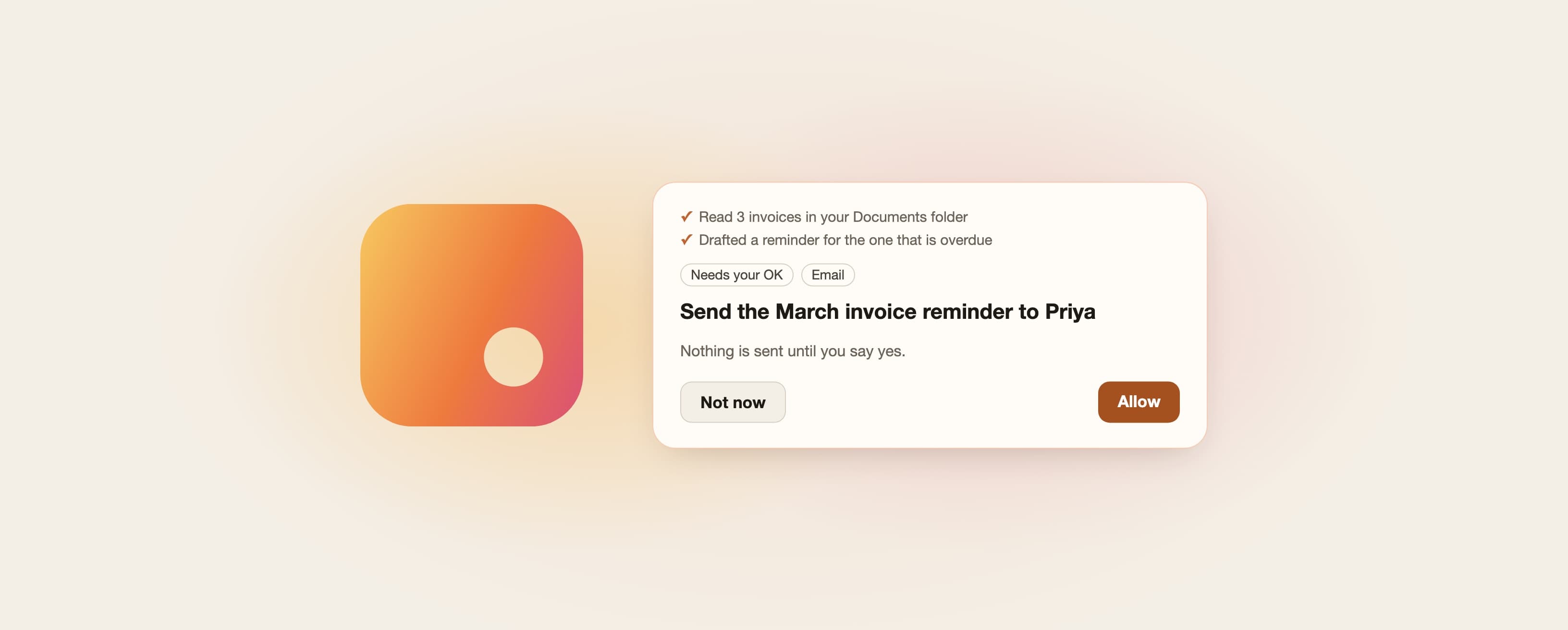
- Sending, publishing, paying and changing wait for you on an approval card that shows exactly what will happen: who it goes to, what it says, what changes.
- Money, deletes and deploys need more: Touch ID on a Mac, or a phrase you type.
You can add your own rules in plain words, such as "never email anyone at example.com". Pivra Desk is built so that no web page, email or prompt can grant the agent permission you didn't give it. Read how approvals and rules work.
We call this "asks before it acts". It is the difference between an assistant you supervise and one you hope behaves.
The honest trade-off
Local models are smaller than the largest cloud models. A model that fits on a laptop is very good at reading, summarising, drafting and short tasks with tools. For long, multi-step work, a large cloud model is often better.
So we don't force a choice. You can run a model on your computer, point Pivra Desk at one you already run with Ollama or LM Studio, or use a cloud model you choose with your own key (Anthropic, OpenAI or OpenRouter) whenever a job needs it. The approvals work the same either way. Choosing a model explains the options.
Why "a billion devices"
There are far more ordinary laptops in the world than there will ever be seats in a data centre. Many of them are modest machines, bought carefully and kept for years. If AI only works well on the newest, most expensive hardware, or only through a monthly cloud bill, it stays a tool for the few.
Our bet is the opposite: make capable intelligence small enough, careful enough and cheap enough to run on the computers people already have. That is why we take memory limits seriously, why we test with smaller models, and why the free plan stays free.
A Bengaluru freelancer with one laptop and three clients deserves the same quality of help as a company with an IT department. That is the point.
What we will not do
A manifesto is also a list of refusals. We will not:
- send your work to Pivra by default;
- train models on your data;
- let a model's output grant itself permission;
- claim things we haven't measured. When we have numbers, we publish them with the machine and the date.
Frequently asked questions
What is Pivra Desk?
Pivra Desk is a local-first personal AI agent for Mac and Windows. It works across your files, browser and apps using a model on your computer or a cloud model you choose, and asks before consequential actions.
Does Pivra Desk work without the internet?
Partly, by design. With a model on your computer, reading, summarising and drafting work offline once the model is downloaded. Web search, connected apps and cloud models need a connection.
Is a local model as good as a large cloud model?
Not for everything. Local models are smaller. They handle everyday reading, summaries and drafting well; long, multi-step jobs are usually better with a large cloud model. Pivra Desk lets you use either, and switch at any time.
Does Pivra see my files?
No. Your agents, chats, memory and rules live in a local database on your computer, and your files stay where they are. Nothing about your work is sent to Pivra by default. The security page lists every data flow.
What does "asks before it acts" mean?
Anything that sends, publishes, pays or changes something waits for your approval on a card showing exactly what will happen. Reading and searching run on their own.
Which computers does it run on?
Macs with Apple silicon (M1 and later) and 64-bit Windows 10 or 11. Install guide.
How much does it cost?
There is a free plan. Plus is US$6 a month (A$9 in Australia); outside Australia it is charged in US dollars, and taxes may apply. See pricing.
Try it
Download Pivra Desk for Mac or Windows, give it something real from your week, and watch it ask before it acts. If something feels wrong, tell us. We read every message.
Author
The Pivra Team
Pivra
The Pivra team writes from product, onboarding, and customer support work with Australian tradies, local services, and small business operators.