From Clicks to Customers: Pairing Google Ads with an AI Chatbot
A practical way to test whether website chat helps paid visitors get answers and submit useful enquiries.
If you're spending money on Google Ads, you're paying for every click. The question is: how many of those clicks are turning into actual leads?
The answer depends on the campaign and landing page. Measure how many visitors leave usable contact information before changing the experience.
A website assistant is one possible way to help the visitor. Test it against your current page.
The problem with sending paid traffic to a static page
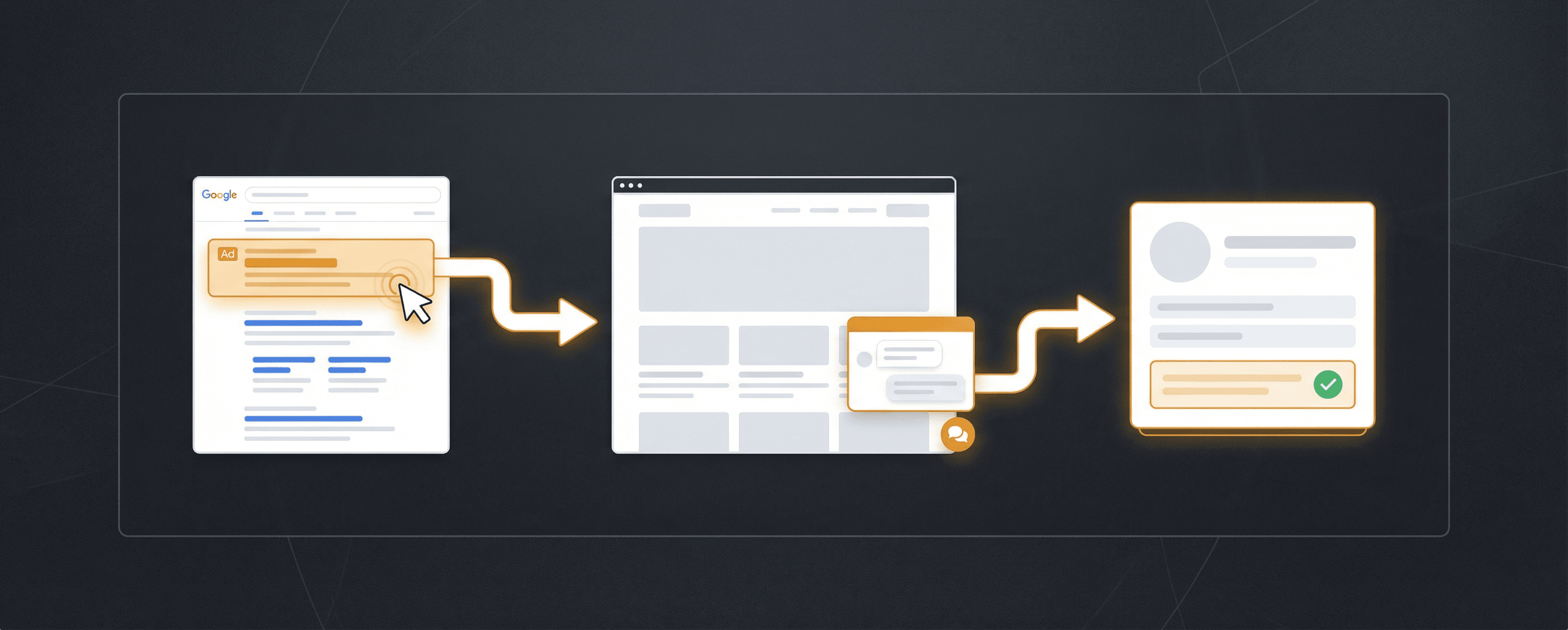
A typical Google Ads funnel looks like this:
- Someone searches "emergency electrician Sydney"
- They click your ad (you pay for the click)
- They land on your services page
- They look around for 30 seconds
- They leave
No form filled. No call made. Money gone.
Why do they leave? Often it's not because they didn't want the service. It's because:
- They couldn't find the answer they needed quickly
- The contact form felt like effort
- They weren't ready to commit to a phone call
- The page didn't address their specific situation
A chatbot may help address some of these questions if it has accurate source material.
How a chatbot improves paid traffic conversion
When a visitor lands from an ad and sees a chat widget, they have a low-friction way to get their specific question answered immediately.
Instead of hunting through your website, they ask:
"Do you do emergency callouts in Penrith?"
And get an instant answer. Then the bot asks for their details. You may receive a lead, but only if the visitor chooses to share details.
The effect on conversion must be measured in your own campaign.
Example:
| Without chatbot | With chatbot | |
|---|---|---|
| Monthly ad spend | $1,000 | $1,000 |
| Clicks | 100 | 100 |
| Conversion rate | 3% | 6% |
| Leads generated | 3 | 6 |
| Cost per lead | $333 | $167 |
Same spend. Twice the leads. This example assumes conversion doubles; it is not a Pivra result or a forecast. Include your actual sales and follow-up costs when calculating return.
Qualifying leads so you follow up on the right ones
Not every click is your ideal customer. With Google Ads you sometimes get:
- People outside your service area
- Jobs below your minimum spend
- Tyre-kickers who are just browsing
A chatbot can qualify leads before they reach you. Configure it to ask:
- "Which suburb are you in?"
- "What's the rough scope of the job?"
- "Are you looking for this week or planning ahead?"
Now the leads in your dashboard are already pre-screened. You follow up on the right ones first.
Setting up the chatbot for paid traffic
1. Match the bot's opening to your ad's intent
If your ad targets "emergency plumber Melbourne", set the bot's greeting to reflect urgency:
"Hi — need emergency plumbing help? Tell me what's happening and I'll get you sorted."
If your ad targets a specific service, open with that service. Test whether matching the opening to the ad helps visitors complete enquiries.
2. Capture details before pushing to a call
Paid traffic visitors are warm but not committed. Don't push them straight to "call us now". Instead, let the bot collect their details and promise a callback. Keep the first step simple, then measure completed enquiries.
3. Use UTM parameters to track chatbot leads
If your CRM or analytics supports it, tag your chatbot lead source so you can see which Google Ads campaigns are driving chatbot enquiries specifically. This lets you optimise your ad spend based on real lead data.
4. Respond fast to chatbot leads
When a visitor comes from a paid ad and leaves their details, they're hot. Aim to respond within 15–30 minutes during business hours. Set up email or SMS notifications in Pivra so you know the moment a lead comes in.
5. Don't send paid traffic to your homepage
Always use a specific landing page that matches your ad's intent. A chatbot on that page can be configured to match the exact service or offer in your ad, making the whole experience cohesive.
The compound effect
Every lead your chatbot captures from paid traffic is:
- A lead you paid for (sunk cost)
- Converted instead of lost
- Potentially worth hundreds or thousands of dollars in revenue
The table is a hypothetical example, not a forecast. Use your own conversion and sales data to decide whether the change pays for itself.
Getting started
Pivra integrates easily with any landing page built on WordPress, Webflow, Squarespace, or custom HTML. Add the embed snippet to your landing page and the chatbot is live immediately.
Start your free Pivra chatbot and test it on your next Google Ads campaign.
Author
The Pivra Team
Pivra
The Pivra team writes from product, onboarding, and customer support work with Australian tradies, local services, and small business operators.